Evidence-based grading, recorded while you teach.

If you have tried evidence-based grading, you know the idea is not the hard part. The hard part is moving the idea from abstract concepts to concrete evidence and then keeping track of what each student has shown you, across a full class, while you are still teaching. ClassApt is built for that part.

Why I Built It This Way

Before ClassApt, my evidence lived on scraps of paper, in my memory, and in a few formal project rubrics. When those fell short, I leaned on multiple-choice quizzes and other assessments that were easy to grade and record. They were easy to record because they measured recall, not mastery.

Now I record what students show me while they work. I grade only 10 to 15 percent of activities directly, and most of those are practice in reading instructions carefully and checking their own work. The rest of my time goes to students, one on one. Gathering evidence requires it, because I can't record what I haven't seen.

I also see students focus on the work itself rather than on how many points an activity is worth. My sample is too small to call that a finding, but it is the change I notice most.

What Makes It Workable

One Tap, in the Moment

The skills you track appear beside every student on the dashboard. A tap records one for today, along with the success criteria for that day's activity. Evidence is recorded where it happens, so it never waits for the end of the day, and the student can know right away what you saw.

The Students panel on the teacher dashboard with the Self-Management overlay on. Each student's name is followed by the codes for the skills being tracked, R and T, and faded concern codes. Boxed codes mark the students who most need to show that skill, and a shaded code marks a student who already has enough evidence.
The dashboard's Students panel with one competency's skills beside each name. All student data shown is fictional.

Seeing Who You Haven't Seen

Some students demonstrate a skill every chance they get. Others work hard to go unnoticed. For each skill, ClassApt marks the students who have gone longest without showing it. It also shows how recently you have had a recorded conversation with each student.

I was surprised how long a student determined to stay unnoticed could go without talking with me and how easy it was for me to let that happen. Now I can see students I haven't connected with recently and make a point to check-in with them.

Students See Their Own Evidence

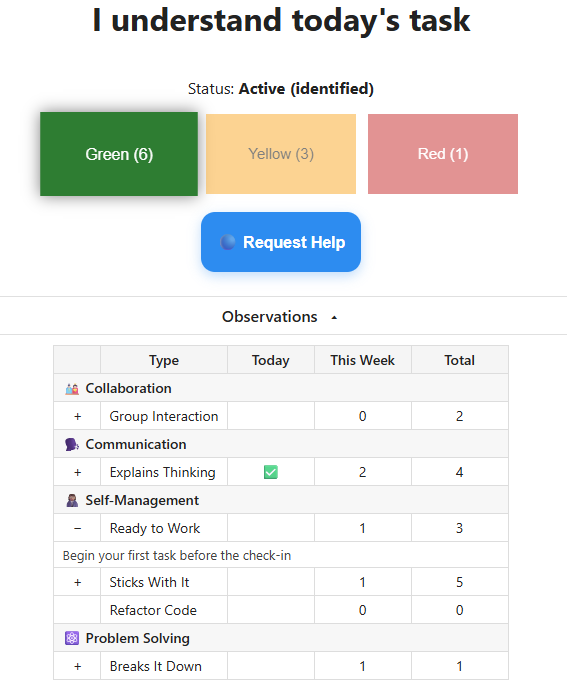
Students see which skills you have observed this week and which you haven't, next to the success criteria for the current activity. That shares the responsibility. A student who sees a skill not yet observed knows to make sure you see it.

Students see only their own evidence. Concerns you record are never shown to them.

A student's check-in page. Below the green, yellow and red buttons, the Observations panel lists each skill by competency, with a check if it was observed today, this week's count and the total. One row is expanded to show its current success criteria.
The student's page: this week's evidence and the current success criteria.

A Framework You Can Change

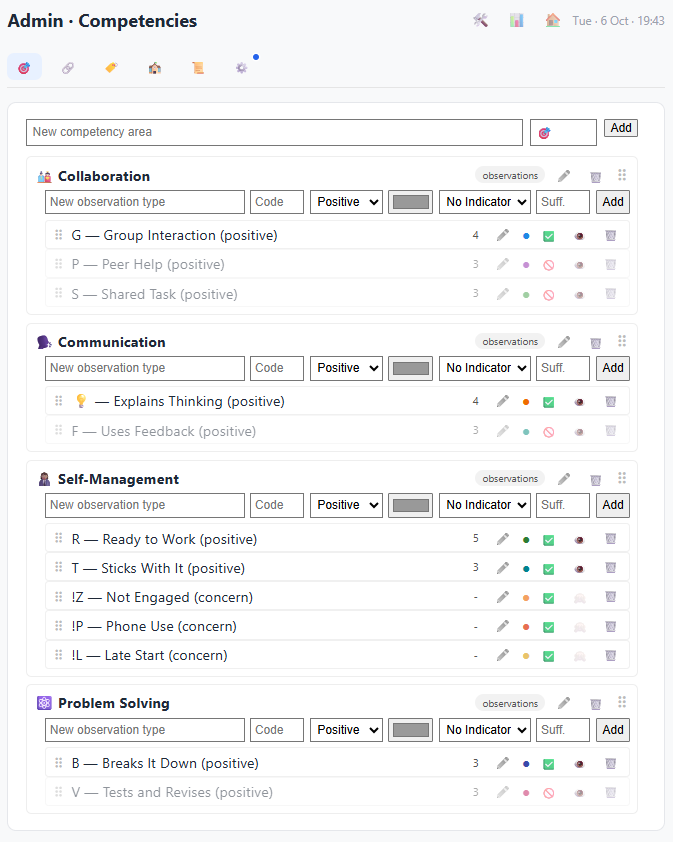
You define your own competencies, indicators and observation types, and you can change them in the middle of the year. Some systems make that hard enough that teachers stop refining their process. Here, adding an observation type or rewriting its success criteria takes a minute, and past evidence keeps the criteria it was recorded with.

The Competencies page in Admin. Cards for Collaboration, Communication, Self-Management and Problem Solving list their observation types with a code, a sufficiency count and controls to edit, show to students or deactivate. Inactive types are grayed out.
Competencies in Admin. Inactive types stay with their history.

Evidence That Adds Up

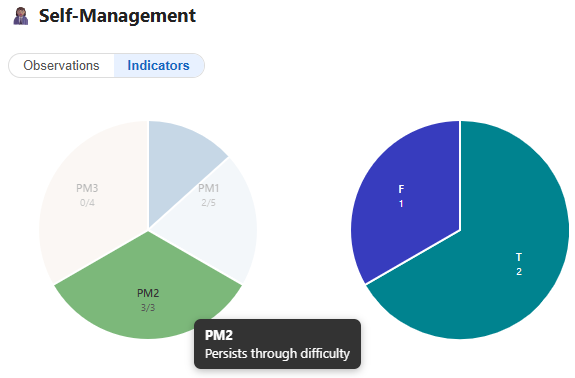
Everything you record builds a picture of each student. For each competency, a chart shows how much evidence a student has for every indicator, compared with the amount you decide is enough. Selecting an indicator shows which observations make up its evidence.

A student's Self-Management indicators. The left chart has one slice per indicator, filled in proportion to the evidence collected against the amount set as enough. PM2, persists through difficulty, is full at 3 of 3. The right chart breaks PM2's evidence down by observation type.
One student's evidence for a competency, by indicator and by observation.

What It Doesn't Do

ClassApt is not a gradebook, and it does not calculate grades. It holds the evidence. Turning evidence into a grade is a professional judgment, and teachers make it in different ways. ClassApt doesn't prescribe one. As more teachers use it, I plan to share examples of how they approach it.

If You Aren't There Yet

You don't need an evidence-based approach to use ClassApt. Check-ins, private help requests and contact tracking are useful on their own. The evidence tools are there when you are ready for them.

Read about the rest of ClassApt.